
 admin
admin
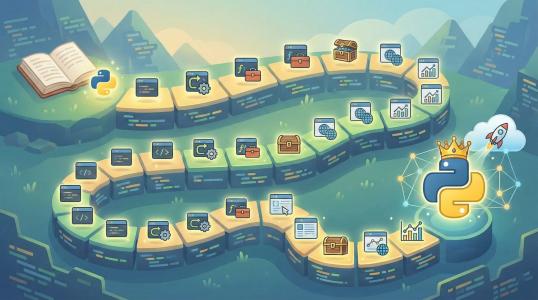
Learn Python in 30 Days: A Step-by-Step Guide for Absolute Beginners
So you want to learn Python in 30 days? That's an ambitious and totally achievable goal! Python has become one of the most popular programming languages in the world, and for good reason. It's powerful enough to build complex applications yet simple enough for beginners to pick up quickly. Whether you're looking to switch careers, automate boring tasks, or just understand what all the coding fuss is about, this guide will walk you through everything you need to know to become a confident Python programmer in just one month.
The key to learning Python fast isn't about cramming syntax into your brain—it's about consistent daily practice, building real projects, and understanding the logic behind the code. This guide breaks down your 30-day journey into manageable daily chunks, each building on the previous day's knowledge. By the end, you'll not only understand Python basics but also have completed several mini-projects that prove your skills.
Why Python is Perfect for Beginners
Before we dive into the 30-day plan, let's talk about why python for beginners is such a smart choice. Python reads almost like English, which means you can focus on learning programming concepts instead of wrestling with confusing syntax. The language powers everything from Instagram to Netflix's recommendation engine, so you're learning a skill that's actually in demand.
Another huge advantage is the massive community support. Stuck on a problem? There's a 99% chance someone else has already solved it and posted the solution online. Plus, Python's extensive library ecosystem means you can do almost anything—web development, data analysis, artificial intelligence, automation, and more—without reinventing the wheel.
Your 30-Day Python Learning Roadmap
This python step by step guide is structured to take you from absolute zero to writing useful programs in just four weeks. Each week focuses on a core concept area, with daily lessons that take about 1-2 hours to complete. Ready? Let's get started!
Week 1: Python Basics and Setup (Days 1-7)
Your first week is all about getting comfortable with the Python environment and understanding fundamental concepts. Don't rush this part—a solid foundation here will make everything else easier.
Day 1: Installing Python and Your First Program
Start by downloading Python from the official website (python.org). Make sure to check the box that says "Add Python to PATH" during installation. Once installed, open your command prompt or terminal and type python --version to verify it's working.
Now, let's write your first program. Open a text editor and create a file called hello.py:
# This is your first Python program
print("Hello, Python world!")
print("I'm ready to learn programming!")
Save it and run it from your terminal by typing python hello.py. Congratulations! You've just written and executed your first Python program.
Day 2: Understanding Variables and Data Types
Today you'll learn how to store information in variables. Python has several built-in data types, but we'll focus on the most common ones: strings, integers, floats, and booleans.
# Variables store information
name = "Alex"
age = 25
height = 5.9
is_learning = True

# Print them out
print(f"My name is {name}")
print(f"I am {age} years old")
print(f"Am I learning Python? {is_learning}")
Practice creating different variables and printing them. Try combining strings with numbers using f-strings, which is a clean way to format your output.
Day 3-4: Working with Strings and Numbers
Spend two days mastering string manipulation and basic math operations. These are skills you'll use in almost every program.
# String methods
message = "python programming"
print(message.upper())  # PYTHON PROGRAMMING
print(message.title())  # Python Programming
print(message.replace("python", "awesome"))

# Math operations
a = 10
b = 3
print(f"Addition: {a + b}")
print(f"Division: {a / b}")
print(f"Floor division: {a // b}")
print(f"Modulus: {a % b}")
Create a simple calculator program that takes two numbers from the user and performs basic operations on them.
Day 5-7: Control Flow with If Statements and Loops
This is where programming gets powerful. You'll learn how to make decisions in your code and repeat actions.
# If statements
temperature = 30
if temperature > 25:
    print("It's hot outside!")
elif temperature > 15:
    print("It's pleasant.")
else:
    print("It's cold.")

# For loops
for i in range(5):
    print(f"Counting: {i}")

# While loops
count = 0
while count < 3:
    print(f"While loop count: {count}")
    count += 1
Build a simple number guessing game where the computer picks a random number between 1 and 10, and the user has to guess it. This project combines if statements and loops perfectly.
Week 2: Data Structures and Functions (Days 8-14)
Now that you understand the basics, it's time to learn about collections of data and how to organize your code into reusable functions.
Day 8-10: Lists, Tuples, and Dictionaries
These three data structures are the backbone of Python programming. You'll use them constantly.
# Lists - ordered, changeable collections
fruits = ["apple", "banana", "cherry"]
fruits.append("orange")
print(fruits[0])  # apple
fruits[1] = "blueberry"

# Tuples - ordered, unchangeable collections
coordinates = (10, 20)
print(coordinates[0])

# Dictionaries - key-value pairs
person = {
    "name": "Sarah",
    "age": 28,
    "city": "New York"
}
print(person["name"])
person["job"] = "Developer"
Create a simple to-do list application using lists. Add functions to add tasks, remove tasks, and display all tasks.
Day 11-14: Functions and Modules
Functions let you reuse code and keep your programs organized. You'll also learn how to import and use modules.
# Defining a function
def greet_user(name):
    """This function greets the user"""
    return f"Hello, {name}! Welcome to Python."

# Calling the function
message = greet_user("Mike")
print(message)

# Function with multiple parameters
def calculate_area(length, width):
    return length * width

area = calculate_area(5, 3)
print(f"The area is: {area}")

# Importing modules
import random
random_number = random.randint(1, 100)
print(f"Random number: {random_number}")
Build a simple contact book application where you can add contacts, search for them, and delete them. Use functions to keep your code clean.
Week 3: Object-Oriented Programming and File Handling (Days 15-21)
This week introduces more advanced concepts that will take your programming skills to the next level.
Day 15-17: Classes and Objects
Object-oriented programming (OOP) is a paradigm that lets you model real-world things in code. It's incredibly powerful once you grasp it.
# Creating a class
class Dog:
    def __init__(self, name, age):
        self.name = name
        self.age = age

    def bark(self):
        return f"{self.name} says woof!"

    def get_info(self):
        return f"{self.name} is {self.age} years old"

# Creating objects
dog1 = Dog("Buddy", 3)
dog2 = Dog("Lucy", 5)

print(dog1.bark())
print(dog2.get_info())
Design a simple banking system with classes for BankAccount and Customer. Include methods for deposit, withdrawal, and checking balance.
Day 18-21: File Input/Output and Error Handling
Learn how to read from and write to files, and how to handle errors gracefully so your programs don't crash.
# Writing to a file
with open("notes.txt", "w") as file:
    file.write("My first file operation\n")
    file.write("Learning Python is fun!")

# Reading from a file
with open("notes.txt", "r") as file:
    content = file.read()
    print(content)

# Error handling
try:
    number = int(input("Enter a number: "))
    result = 10 / number
except ValueError:
    print("That's not a valid number!")
except ZeroDivisionError:
    print("You can't divide by zero!")
else:
    print(f"Result: {result}")
Create a simple journal application that lets you write entries, save them to a file, and read them back later.
Week 4: Projects and Libraries (Days 22-30)
In your final week, you'll work on larger projects and explore Python's vast ecosystem of libraries.
Day 22-25: Mini Projects
Combine everything you've learned to build something useful. Here are some ideas:
- Weather App: Use the requests library to fetch weather data from an API
- Expense Tracker: Track your daily expenses and generate simple reports
- Password Manager: Store and retrieve encrypted passwords
# Simple expense tracker example
expenses = []

def add_expense(amount, category):
    expenses.append({"amount": amount, "category": category})

def show_expenses():
    for expense in expenses:
        print(f"{expense['category']}: ${expense['amount']}")

add_expense(25.50, "Food")
add_expense(40.00, "Transport")
show_expenses()
Day 26-28: Working with Popular Libraries
Explore libraries that match your interests:
- Web Development: Flask or Django
- Data Analysis: Pandas and NumPy
- Automation: Selenium or Beautiful Soup
- GUI Apps: Tkinter or PyQt
# Using the datetime library
from datetime import datetime, timedelta

today = datetime.now()
print(f"Today is: {today.strftime('%A, %B %d, %Y')}")

# Add 7 days
next_week = today + timedelta(days=7)
print(f"Next week: {next_week.strftime('%A, %B %d, %Y')}")
Day 29-30: Final Project and Next Steps
For your final project, build something that solves a personal problem or interests you. This could be a web scraper, a simple game, or an automation script. The key is to apply everything you've learned.
After completing your 30 days, your journey is just beginning. Python is a deep language with endless possibilities. Consider specializing in areas like web development, data science, machine learning, or automation based on your interests.
Common Challenges and How to Overcome Them
Learning Python in 30 days is exciting, but you'll definitely hit some roadblocks. Here are the most common challenges beginners face and practical solutions to overcome them.
Challenge 1: Getting Stuck on Error Messages
Python's error messages can look scary at first. You'll see terms like "SyntaxError," "IndentationError," or "NameError" and feel completely lost.
Solution: Read error messages from bottom to top. The last line usually tells you exactly what went wrong. Google the exact error message—someone has already solved it. Use print statements to check variable values at different points in your code. This technique, called "debugging by printing," helps you understand what's happening inside your program.
Challenge 2: Forgetting Syntax
It's completely normal to forget how to write a for loop or the exact format of a dictionary. You might feel like you're not learning if you have to look things up constantly.
Solution: Don't memorize syntax—understand concepts. Keep a personal cheat sheet or digital notebook of code snippets you use often. The more you practice, the more natural the syntax will become. Even professional developers look up documentation daily. Focus on understanding why something works, not just memorizing how to write it.
Challenge 3: Feeling Overwhelmed by Information
There's so much to learn: variables, loops, functions, classes, libraries, frameworks. Where does it end? You might feel like you're drowning in new concepts.
Solution: Trust the process and stick to one topic at a time. This python crash course is designed to introduce concepts gradually. When you feel overwhelmed, take a step back and review what you've already mastered. You've learned more than you think. Celebrate small wins, like getting a loop to work or successfully creating your first function.
Challenge 4: Not Knowing What to Build
After learning the basics, many beginners stare at a blank screen, unsure what to create. Tutorial examples feel too simple, but big projects feel impossible.
Solution: Start by automating something you do manually. Do you rename files often? Write a script for that. Do you track expenses in a spreadsheet? Build a simple expense tracker. The best projects solve personal problems. Browse GitHub for beginner-friendly projects, or modify existing tutorials to add your own features. Even small customizations help you learn.
Challenge 5: Imposter Syndrome
You might look at other people's code and think, "I'll never be that good." Comparing your day 10 skills to someone's year 5 skills is discouraging.
Solution: Remember that everyone starts exactly where you are now. The developers you admire were once beginners too. Focus on your own progress, not others'. Keep a log of what you learn each day. When you look back after 30 days, you'll be amazed at how far you've come. Programming is a journey, not a destination.
Practical Tips for Success
To make the most of your 30-day python programming tutorial, follow these proven strategies:
- Code Every Day: Even 30 minutes daily is better than 5 hours once a week. Consistency builds muscle memory.
- Teach What You Learn: Explain concepts to a friend, write a blog post, or create a short video. Teaching forces you to understand deeply.
- Join a Community: Find Python communities on Reddit (r/learnpython), Discord, or local meetups. Asking questions and helping others accelerates learning.
- Read Other People's Code: GitHub is full of open-source Python projects. Reading code helps you learn new patterns and better practices.
- Don't Copy-Paste: Type out code examples manually. This helps you notice details and remember syntax better.
- Take Breaks: When stuck, step away for 15 minutes. Your brain often solves problems in the background.
Conclusion: Your Python Journey Starts Now
Learning Python in 30 days is an incredible achievement that opens doors to countless opportunities. You've gone from knowing nothing about programming to building real applications that solve problems. This python learning roadmap has given you the foundation, but the real learning happens when you start building projects that excite you.
Remember, every expert programmer was once a beginner who refused to give up. The syntax and concepts will become second nature with practice. The most important skill you've developed isn't just writing Python code—it's the ability to think logically, break down problems, and persist through challenges.
Now it's time to take action. Don't let this be just another tutorial you read and forget. Start today, right now. Install Python, write your first program, and commit to the 30-day challenge. The future you—who's building amazing things with code—will thank you for starting today.
Ready to become a Python programmer? Your 30-day transformation begins with a single line of code. Let's write it together.
Popular Posts



Categories
Tags

Comments